10/27/2010

How to Increase Screen Resolution for Ubuntu in Virtual Box

By Cric, eHow Member

Instructions

  1. Start Virtual box and log into Ubuntu.
  2. Hit the right ctrl key so you can get your mouse pointer outside the virtual machine.
  3. Go to top of virtual window, click on devices then select "Install Guest Additions". You will see a window pop up inside Ubuntu showing you that there are some new files mounted in a virtual CDROM drive. One of those files should be VBoxLinuxAdditions.run
  4. Click inside the Ubuntu screen again then go to Applications - Accessories then Terminal. The terminal window is where you will run the file from, but first we must navigate to the correct directory.
  5. Type this... cd /media/cdrom0 (then hit enter, there is a space after cd!)
  6. Next type... dir (You should see amongst the files displayed VBoxLinuxAdditions.run)
  7. Now type... sudo sh ./VBoxLinuxAdditions.run (yes, that is a full stop before the slash!) after you hit enter and it has done its stuff, the files are now accessable from Ubuntu.
  8. You now need to reboot the virtual machine or press Ctrl+Alt+backspace.
  9. Log onto the Ubuntu desktop and this time go to System - Preferences then Screen Resolution. You should now have more options

10/03/2010

Trigger in SQL Server 2005

This trigger check if a Player id is exist or not in another table, if exist this trigger will roll back the transaction and inform an error message. 
IF EXISTS (SELECT name FROM sysobjects
      WHERE name = 'AmaInsert' AND type = 'TR')
   DROP TRIGGER AmaInsert
GO
CREATE TRIGGER AmaInsert
ON Amateur
FOR INSERT
AS
 DECLARE @id int
 SET @id = (SELECT PlayerID from inserted)
IF EXISTS(SELECT * FROM Professional A WHERE A.PlayerID = @id)
BEGIN
 RAISERROR ('This PlayerID %d aldredy exist in table Professional',16,1,@id)
    ROLLBACK TRANSACTION
END

SELECT column_name from inserted mean get the recently inserted value when the trigger fired.

8/30/2010

Fixing XAMPP localhost in Windows 7

While working with reCaptcha on localhost in Windows 7 64 bit, I faced a problem that I couldn't get the correct localhost IP. It came with ::1: and reCaptcha couldn't check whether entered value was valid or not. Here is the solution:
  1. Open C:\Windows\System32\drivers\etc\host in a text editor such as Notepad.
  2. Remove # before 127.0.0.1 localhost
  3. Remove line: # ::1: localhost
  4. Save and you're done.
Source: Haqqi

8/28/2010

Re-install GRUB on Fedora 13

Fedora, likes other Linux distros, comes with GRUB to manage booting process. If you have multi-OS on your computer, GRUB will help you choose which OS will run when your system starts. When I install Fedora 13 on my lap, GRUB worked fine. But it chose Fedora as the default OS and that's not what I want. I have Windows 7 installed on my lappy and I want it become the first OS. After playing with EasyBCD, I was unable to boot to Windows. To fix this, I used Repair my computer function in Windows installation disc. It made everything went back to normal, except that GRUB was gone. How to fix this problem? It's easy as a piece of cake, just follow these steps:
  1. Use your Fedora installation CD to boot to live session.
  2. Open Terminal and enter these command.

su
// This command will give you root privilege

grub>find /boot/grub/stage1
// Find where your GRUB was installed. It will give a result such as (hd0,5)

grub>root (hd0,5)
grub>setup (hd0)


You're done.
Useful article: Solving Boot Problems with Grub - 2nd Edition

5/29/2010

Code download file trong JSP

Code được sử dụng để tạo trang download, khi người sử dụng click download thi sẽ tự động bung của sổ save file của trình duyệt.

<%
String fileName = (String)request.getParameter("fileName");
String path = request.getRealPath("/")+"/WEB-INF/fileDownload/";

File file = new File(path+fileName);
System.out.println("file path:"+path+fileName);
System.out.println("Name:"+file.getName());

FileInputStream fis = new FileInputStream(file);
FileTypeMap ftm = new MimetypesFileTypeMap();

response.setContentType(ftm.getContentType(path+fileName));
response.setHeader("Content-Disposition",
"attachment; filename=" + file.getName());
int iRead;
while((iRead=fis.read())!=-1){
response.getOutputStream().write(iRead);      
}
response.getOutputStream().flush();
System.out.println("Download complete");
%>

5/28/2010

Ghi tập tin unicode trong Java [new]

Cách này (có lẽ) đơn giản hơn cách trước. Nhưng trong đoạn code này, chỉ khai một một ByteBuffer có 1024 bytes, khi ghi một chuỗi quá dài sẽ quăng lỗi java.nio.BufferOverflowException

import java.io.File;
import java.io.FileNotFoundException;
import java.io.FileOutputStream;
import java.io.IOException;
import java.io.UnsupportedEncodingException;
import java.nio.ByteBuffer;
import java.nio.channels.FileChannel;

/**
*
* @author hungnq
*/
public class UnicodeUtil {

/**
* Constructor of class UnicodeUtil
*/
public UnicodeUtil(){

}
/**
*
* @param contents
* @param filePath
*/
public static void writeUnicode(String contents,String filePath){
try {
//Get byte of String in UFT-8 charset
byte[] utf8byte = contents.getBytes("UTF-8");
File aFile = new File(filePath);
FileOutputStream fos = null;
try {
fos = new FileOutputStream(aFile, true);
System.out.println("FileStream created successfully!");
} catch (FileNotFoundException ex) {
ex.printStackTrace();
}
FileChannel fc = fos.getChannel();
ByteBuffer buf = ByteBuffer.allocate(1024);
for (byte b : utf8byte) {
buf.put(b);
}
buf.flip();
try {
fc.write(buf);
fc.close();
System.out.println("Buffered contents written to file.");
} catch (IOException ex) {
ex.printStackTrace();
}
} catch (UnsupportedEncodingException ex) {
ex.printStackTrace();
}
}
}
Sử dụng như sau
String phrase = new String("Công bố phần mềm kế toán online đầu tiên tại Việt Nam");
String filePath = "C:"+File.separator+"unicode.txt";
UnicodeUtil.writeUnicode(phrase,filePath);

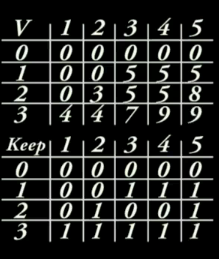
The 0/1 Knapsack Problem - Dynamic Programming

 References: https://www.youtube.com/watch?v=EH6h7WA7sDw  Class Item class Item { private $_weight; private $_value; public functi...