<%
String fileName = (String)request.getParameter("fileName");
String path = request.getRealPath("/")+"/WEB-INF/fileDownload/";

File file = new File(path+fileName);
System.out.println("file path:"+path+fileName);
System.out.println("Name:"+file.getName());

FileInputStream fis = new FileInputStream(file);
FileTypeMap ftm = new MimetypesFileTypeMap();

response.setContentType(ftm.getContentType(path+fileName));
response.setHeader("Content-Disposition",
"attachment; filename=" + file.getName());
int iRead;
while((iRead=fis.read())!=-1){
response.getOutputStream().write(iRead);
}
response.getOutputStream().flush();
System.out.println("Download complete");
%>
Showing posts with label java. Show all posts
Showing posts with label java. Show all posts
5/29/2010
Code download file trong JSP
Code được sử dụng để tạo trang download, khi người sử dụng click download thi sẽ tự động bung của sổ save file của trình duyệt.

5/28/2010
Ghi tập tin unicode trong Java [new]
Cách này (có lẽ) đơn giản hơn cách trước. Nhưng trong đoạn code này, chỉ khai một một ByteBuffer có 1024 bytes, khi ghi một chuỗi quá dài sẽ quăng lỗi java.nio.BufferOverflowException
import java.io.File;
import java.io.FileNotFoundException;
import java.io.FileOutputStream;
import java.io.IOException;
import java.io.UnsupportedEncodingException;
import java.nio.ByteBuffer;
import java.nio.channels.FileChannel;

/**
*
* @author hungnq
*/
public class UnicodeUtil {

/**
* Constructor of class UnicodeUtil
*/
public UnicodeUtil(){

}
/**
*
* @param contents
* @param filePath
*/
public static void writeUnicode(String contents,String filePath){
try {
//Get byte of String in UFT-8 charset
byte[] utf8byte = contents.getBytes("UTF-8");
File aFile = new File(filePath);
FileOutputStream fos = null;
try {
fos = new FileOutputStream(aFile, true);
System.out.println("FileStream created successfully!");
} catch (FileNotFoundException ex) {
ex.printStackTrace();
}
FileChannel fc = fos.getChannel();
ByteBuffer buf = ByteBuffer.allocate(1024);
for (byte b : utf8byte) {
buf.put(b);
}
buf.flip();
try {
fc.write(buf);
fc.close();
System.out.println("Buffered contents written to file.");
} catch (IOException ex) {
ex.printStackTrace();
}
} catch (UnsupportedEncodingException ex) {
ex.printStackTrace();
}
}
}
Sử dụng như sauString phrase = new String("Công bố phần mềm kế toán online đầu tiên tại Việt Nam");
String filePath = "C:"+File.separator+"unicode.txt";
UnicodeUtil.writeUnicode(phrase,filePath);
5/16/2010
Thiết lập màu xen kẽ cho các dòng trong JTable

import java.awt.Color;
import javax.swing.JTable;
import javax.swing.table.*;

public class ColorTable extends JTable {

/** Creates a new instance of ColorTable */
private DefaultTableCellRenderer oddRenderer;
private DefaultTableCellRenderer evenRenderer;

public ColorTable() {
super();
}

public ColorTable(TableModel tm) {
super(tm);
}

public ColorTable(Object[][] data, Object[] columns) {
super(data, columns);
}

public ColorTable(int rows, int columns) {
super(rows, columns);
}

/**
* If row is an even number, getCellRenderer() returns a DefaultTableCellRenderer
* with white background. For odd rows, this method returns a DefaultTableCellRenderer
* with a light gray background.
*/
@Override
public TableCellRenderer getCellRenderer(int row, int column) {
TableCellRenderer cellRenderer;
if (oddRenderer == null) {
oddRenderer = new DefaultTableCellRenderer();
}
if (evenRenderer == null) {
evenRenderer = new DefaultTableCellRenderer();
evenRenderer.setBackground(new Color(181, 230, 29));
}
cellRenderer = ((row%2)==0)? oddRenderer : evenRenderer;
return cellRenderer;
}
} 
Kéo một JTable vào trong form (NetBean), sau đó trong phần Custom Creation Code thêm dòng
new ColorTable()Thế là xong :D
5/09/2010
Ghi tập tin Unicode trong Java
Write file with Unicode contents
Khi làm bài tập Lập trình mạng, tớ có nhu cầu ghi nội dung của một luồng RSS thành tập tin XML. Làm thử theo bài hướng dẫn trên trang của Sun thì tập tin ghi ra bị lỗi, các ký tự Unicode không đọc được. Google một hồi thì ra hướng dẫn này.
When I was coding for my Network Programming's coursework, I faced a common problem in Java: writing a file. Following the tutorial on Sun's website, what I got is a file with wrong encoding. All Unicode characters were missed. After googling for a while, I found this useful snippet, thanks to Trip over IT.
Tạo tập tin UnicodeUtils.java
First, create a file named UnicodeUtils.java.
Sử dụng
Then, in your code, use it as follow:
Khi làm bài tập Lập trình mạng, tớ có nhu cầu ghi nội dung của một luồng RSS thành tập tin XML. Làm thử theo bài hướng dẫn trên trang của Sun thì tập tin ghi ra bị lỗi, các ký tự Unicode không đọc được. Google một hồi thì ra hướng dẫn này.
When I was coding for my Network Programming's coursework, I faced a common problem in Java: writing a file. Following the tutorial on Sun's website, what I got is a file with wrong encoding. All Unicode characters were missed. After googling for a while, I found this useful snippet, thanks to Trip over IT.
Tạo tập tin UnicodeUtils.java
First, create a file named UnicodeUtils.java.
import java.io.BufferedReader;
import java.io.BufferedWriter;
import java.io.ByteArrayInputStream;
import java.io.ByteArrayOutputStream;
import java.io.IOException;
import java.io.InputStream;
import java.io.InputStreamReader;
import java.io.OutputStreamWriter;
import java.io.PushbackInputStream;
import java.io.UnsupportedEncodingException;
import java.io.Writer;

public class UnicodeUtil {

public static byte[] convert(byte[] bytes, String encout) throws Exception {
// Workaround for bug that will not be fixed by SUN
// http://bugs.sun.com/bugdatabase/view_bug.do?bug_id=4508058
UnicodeInputStream uis = new UnicodeInputStream(new ByteArrayInputStream(bytes), "ASCII");
boolean unicodeOutputReqd = (getBOM(encout) != null) ? true : false;
String enc = uis.getEncoding();
String BOM = getBOM(enc); // get the BOM of the inputstream

if (BOM == null) {
// inputstream looks like ascii...
// create a BOM based on the outputstream
BOM = getBOM(encout);
}
uis.close();

ByteArrayOutputStream out = new ByteArrayOutputStream();
BufferedReader br = new BufferedReader(new InputStreamReader(new ByteArrayInputStream(bytes, uis.getBOMOffset(), bytes.length), enc));
Writer w = new BufferedWriter(new OutputStreamWriter(out, encout));

// dont write a BOM for ascii(out) as the OutputStreamWriter
// will not process it correctly.
if (BOM != null && unicodeOutputReqd) {
w.write(BOM);
}

char[] buffer = new char[4096];
int len;
while ((len = br.read(buffer)) != -1) {
w.write(buffer, 0, len);
}

br.close(); // Close the input.
w.close(); // Flush and close output.
return out.toByteArray();
}

public static String getBOM(String enc) throws UnsupportedEncodingException {
if ("UTF-8".equals(enc)) {
byte[] bom = new byte[3];
bom[0] = (byte) 0xEF;
bom[1] = (byte) 0xBB;
bom[2] = (byte) 0xBF;
return new String(bom, enc);
} else if ("UTF-16BE".equals(enc)) {
byte[] bom = new byte[2];
bom[0] = (byte) 0xFE;
bom[1] = (byte) 0xFF;
return new String(bom, enc);
} else if ("UTF-16LE".equals(enc)) {
byte[] bom = new byte[2];
bom[0] = (byte) 0xFF;
bom[1] = (byte) 0xFE;
return new String(bom, enc);
} else if ("UTF-32BE".equals(enc)) {
byte[] bom = new byte[4];
bom[0] = (byte) 0x00;
bom[1] = (byte) 0x00;
bom[2] = (byte) 0xFE;
bom[3] = (byte) 0xFF;
return new String(bom, enc);
} else if ("UTF-32LE".equals(enc)) {
byte[] bom = new byte[4];
bom[0] = (byte) 0x00;
bom[1] = (byte) 0x00;
bom[2] = (byte) 0xFF;
bom[3] = (byte) 0xFE;
return new String(bom, enc);
} else {
return null;
}

}

public static class UnicodeInputStream extends InputStream {
private PushbackInputStream internalIn;

private boolean isInited = false;

private int BOMOffset = -1;

private String defaultEnc;

private String encoding;

public static final int BOM_SIZE = 4;

public UnicodeInputStream(InputStream in, String defaultEnc) {
internalIn = new PushbackInputStream(in, BOM_SIZE);
this.defaultEnc = defaultEnc;
}

public String getDefaultEncoding() {
return defaultEnc;
}

public String getEncoding() {
if (!isInited) {
    try {
        init();
    } catch (IOException ex) {
        IllegalStateException ise = new IllegalStateException("Init method failed.");
        ise.initCause(ise);
        throw ise;
    }
}
return encoding;
}

/**
* Read-ahead four bytes and check for BOM marks. Extra bytes are unread
* back to the stream, only BOM bytes are skipped.
*/
protected void init() throws IOException {
if (isInited)
    return;

byte bom[] = new byte[BOM_SIZE];
int n, unread;
n = internalIn.read(bom, 0, bom.length);

if ((bom[0] == (byte) 0x00) && (bom[1] == (byte) 0x00) && (bom[2] == (byte) 0xFE) && (bom[3] == (byte) 0xFF)) {
    encoding = "UTF-32BE";
    unread = n - 4;
} else if ((bom[0] == (byte) 0xFF) && (bom[1] == (byte) 0xFE) && (bom[2] == (byte) 0x00) && (bom[3] == (byte) 0x00)) {
    encoding = "UTF-32LE";
    unread = n - 4;
} else if ((bom[0] == (byte) 0xEF) && (bom[1] == (byte) 0xBB) && (bom[2] == (byte) 0xBF)) {
    encoding = "UTF-8";
    unread = n - 3;
} else if ((bom[0] == (byte) 0xFE) && (bom[1] == (byte) 0xFF)) {
    encoding = "UTF-16BE";
    unread = n - 2;
} else if ((bom[0] == (byte) 0xFF) && (bom[1] == (byte) 0xFE)) {
    encoding = "UTF-16LE";
    unread = n - 2;
} else {
    // Unicode BOM mark not found, unread all bytes
    encoding = defaultEnc;
    unread = n;
}
BOMOffset = BOM_SIZE - unread;
if (unread > 0)
    internalIn.unread(bom, (n - unread), unread);

isInited = true;
}

public void close() throws IOException {
// init();
isInited = true;
internalIn.close();
}

public int read() throws IOException {
// init();
isInited = true;
return internalIn.read();
}

public int getBOMOffset() {
return BOMOffset;
}
}

}
Sử dụng
Then, in your code, use it as follow:
Hope that helps!
    try {
        String phrase = new String("Tờ báo điện tử dở nhất Việt Nam dành cho người xa quê hương");
        byte[] out = UnicodeUtils.convert(phrase.getBytes("UTF-16"), "UTF-8");

        FileOutputStream fo = new FileOutputStream("test.txt");
        fo.write(out);
        fo.close();
    } catch (Exception ex) {
        ex.printStackTrace();
    }
Subscribe to:
Posts (Atom)
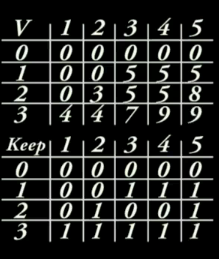
The 0/1 Knapsack Problem - Dynamic Programming
References: https://www.youtube.com/watch?v=EH6h7WA7sDw Class Item class Item { private $_weight; private $_value; public functi...
-
$my_array = array(2, "a", null, 2.5, NULL, 0, "", 8, -1,array()); class ArrayFilter { public static function not_emp...
-
 Hôm nay dùng SVN mới biết là mặc định NetBeans dùng 4 spaces thay vì 1 tab khi chọn chuột phải format, làm update code từ SVN về đỏ lòm, mặc...
-
 References: https://www.youtube.com/watch?v=EH6h7WA7sDw Class Item class Item { private $_weight; private $_value; public functi...